Note
Go to the end to download the full example code.
Example of designing a shielded biplanar coil
import pyvista as pv
from bfieldtools._example_plots import mesh_actor
from bfieldtools._example_plots import triangle_mesh

pv.set_plot_theme("document")


import numpy as np
import matplotlib.pyplot as plt
import trimesh

from bfieldtools.mesh_conductor import MeshConductor, StreamFunction
from bfieldtools.contour import scalar_contour
from bfieldtools.viz import plot_3d_current_loops
from bfieldtools.utils import load_example_mesh, combine_meshes


# Set unit, e.g. meter or millimeter.
# This doesn't matter, the problem is scale-invariant
scaling_factor = 0.1

# Load simple plane mesh that is centered on the origin
planemesh = load_example_mesh("10x10_plane_hires")
planemesh.apply_scale(scaling_factor)

# Specify coil plane geometry
center_offset = np.array([0, 0, 0]) * scaling_factor
standoff = np.array([0, 4, 0]) * scaling_factor

# Create coil plane pairs
coil_plus = trimesh.Trimesh(
    planemesh.vertices + center_offset + standoff, planemesh.faces, process=False
)

coil_minus = trimesh.Trimesh(
    planemesh.vertices + center_offset - standoff, planemesh.faces, process=False
)

mesh1 = combine_meshes((coil_minus, coil_plus))
mesh2 = mesh1.copy()
mesh2.apply_scale(1.4)

coil1 = MeshConductor(mesh_obj=mesh1, basis_name="inner", N_sph=4)
coil2 = MeshConductor(mesh_obj=mesh2, basis_name="inner", N_sph=4)

M11 = coil1.inductance
M22 = coil2.inductance
M21 = coil2.mutual_inductance(coil1)
# Mapping from I1 to I2, constraining flux through mesh2 to zero
P = -np.linalg.solve(M22, M21)

A1, Beta1 = coil1.sph_couplings
A2, Beta2 = coil2.sph_couplings

# Use lines below to get coulings with different normalization
# from bfieldtools.sphtools import compute_sphcoeffs_mesh
# A1, Beta1 = compute_sphcoeffs_mesh(mesh1, 5, normalization='energy', R=1)
# A2, Beta2 = compute_sphcoeffs_mesh(mesh2, 5, normalization='energy', R=1)

# Beta1 = Beta1[:, coil1.inner_vertices]
# Beta2 = Beta2[:, coil2.inner_vertices]

x = y = np.linspace(-0.8, 0.8, 50)  # 150)
X, Y = np.meshgrid(x, y, indexing="ij")
points = np.zeros((X.flatten().shape[0], 3))
points[:, 0] = X.flatten()
points[:, 1] = Y.flatten()


CB1 = coil1.B_coupling(points)
CB2 = coil2.B_coupling(points)

CU1 = coil1.U_coupling(points)
CU2 = coil2.U_coupling(points)
Computing the inductance matrix...
Computing self-inductance matrix using rough quadrature (degree=2).              For higher accuracy, set quad_degree to 4 or more.
Estimating 34964 MiB required for 3184 by 3184 vertices...
Computing inductance matrix in 60 chunks (13922 MiB memory free),              when approx_far=True using more chunks is faster...
Computing triangle-coupling matrix
Inductance matrix computation took 22.81 seconds.
Computing the inductance matrix...
Computing self-inductance matrix using rough quadrature (degree=2).              For higher accuracy, set quad_degree to 4 or more.
Estimating 34964 MiB required for 3184 by 3184 vertices...
Computing inductance matrix in 60 chunks (13755 MiB memory free),              when approx_far=True using more chunks is faster...
Computing triangle-coupling matrix
Inductance matrix computation took 22.74 seconds.
Estimating 34964 MiB required for 3184 by 3184 vertices...
Computing inductance matrix in 60 chunks (13617 MiB memory free),              when approx_far=True using more chunks is faster...
Computing triangle-coupling matrix
Computing coupling matrices
l = 1 computed
l = 2 computed
l = 3 computed
l = 4 computed
Computing coupling matrices
l = 1 computed
l = 2 computed
l = 3 computed
l = 4 computed
Computing magnetic field coupling matrix, 3184 vertices by 2500 target points... took 5.11 seconds.
Computing magnetic field coupling matrix, 3184 vertices by 2500 target points... took 5.11 seconds.
Computing scalar potential coupling matrix, 3184 vertices by 2500 target points... took 7.08 seconds.
Computing scalar potential coupling matrix, 3184 vertices by 2500 target points... took 7.08 seconds.
alpha[15] = 1 Minimization of magnetic energy with spherical harmonic constraint
beta = np.zeros(Beta1.shape[0])
beta[7] = 1  # Gradient
# beta[2] = 1  # Homogeneous

# Minimum residual
_lambda = 1e3
# Minimum energy
# _lambda=1e-3
I1inner = np.linalg.solve(C.T @ C + M * ssmax / _lambda, C.T @ beta)

I2inner = P @ I1inner

s1 = StreamFunction(I1inner, coil1)
s2 = StreamFunction(I2inner, coil2)


B1 = CB1 @ s1
B2 = CB2 @ s2

U1 = CU1 @ s1
U2 = CU2 @ s2
cc1 = scalar_contour(mesh1, mesh1.vertices[:, 2], contours=[-0.001])
cc2 = scalar_contour(mesh2, mesh2.vertices[:, 2], contours=[-0.001])
cx10 = cc1[0][:, 1]
cy10 = cc1[0][:, 0]
cx20 = cc2[0][:, 1]
cy20 = cc2[0][:, 0]

cx11 = cc1[1][:, 1]
cy11 = cc1[1][:, 0]
cx21 = cc2[1][:, 1]
cy21 = cc2[1][:, 0]

B = (B1.T + B2.T)[:2].reshape(2, x.shape[0], y.shape[0])
lw = np.sqrt(B[0] ** 2 + B[1] ** 2)
lw = 2 * np.log(lw / np.max(lw) * np.e + 1.1)

xx = np.linspace(-1, 1, 16)
# seed_points = 0.56*np.array([xx, -np.sqrt(1-xx**2)])
# seed_points = np.hstack([seed_points, (0.56*np.array([xx, np.sqrt(1-xx**2)]))])
# seed_points = np.hstack([seed_points, (0.56*np.array([np.zeros_like(xx), xx]))])
seed_points = np.array([cx10 + 0.001, cy10])
seed_points = np.hstack([seed_points, np.array([cx11 - 0.001, cy11])])
seed_points = np.hstack([seed_points, (0.56 * np.array([np.zeros_like(xx), xx]))])

# plt.streamplot(x,y, B[1], B[0], density=2, linewidth=lw, color='k',
#               start_points=seed_points.T, integration_direction='both')
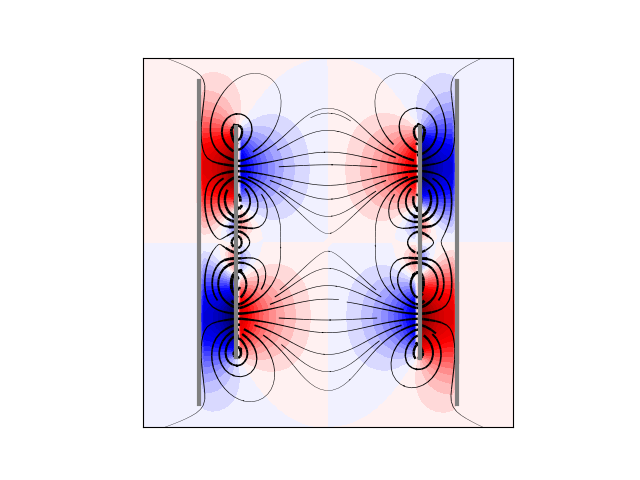
U = (U1 + U2).reshape(x.shape[0], y.shape[0])
U /= np.max(U)
plt.figure()
plt.contourf(X, Y, U.T, cmap="seismic", levels=40)
# plt.imshow(U, vmin=-1.0, vmax=1.0, cmap='seismic', interpolation='bicubic',
#           extent=(x.min(), x.max(), y.min(), y.max()))
plt.streamplot(
    x,
    y,
    B[1],
    B[0],
    density=2,
    linewidth=lw,
    color="k",
    start_points=seed_points.T,
    integration_direction="both",
    arrowsize=0.1,
)

# plt.plot(seed_points[0], seed_points[1], '*')

plt.plot(cx10, cy10, linewidth=3.0, color="gray")
plt.plot(cx20, cy20, linewidth=3.0, color="gray")
plt.plot(cx11, cy11, linewidth=3.0, color="gray")
plt.plot(cx21, cy21, linewidth=3.0, color="gray")
plt.axis("image")

plt.xticks([])
plt.yticks([])
Processing contour, value: -0.001
Processing contour, value: -0.001

([], [])
N = 20
mm = max(abs(s1))
dd = 2 * mm / N
vmin = -dd * N / 2 + dd / 2
vmax = dd * N / 2 - dd / 2
contour_vals1 = np.arange(vmin, vmax, dd)
mm = max(abs(s2))
N2 = (2 * mm - dd) // dd
if N2 % 2 == 0:
    N2 -= 1
vmin = -dd * N2 / 2
vmax = mm
contour_vals2 = np.arange(vmin, vmax, dd)
contours1 = scalar_contour(mesh1, s1.vert, contours=contour_vals1)
contours2 = scalar_contour(mesh2, s2.vert, contours=contour_vals2)


def setscene(scene1, surface, coil):
    mesh_actor(surface).mapper.interpolate_before_map = True
    mesh_actor(surface).mapper.lookup_table.n_values = 32
    scene1.view_xz()
    if coil == 1:
        scene1.camera.position = [
            4.7267030067743576e-08,
            2.660205137153174,
            8.52196480605194e-08,
        ]
        scene1.camera.focal_point = [
            4.7267030067743576e-08,
            0.4000000059604645,
            8.52196480605194e-08,
        ]
        scene1.camera.view_angle = 30.0
        scene1.camera.up = [1.0, 0.0, 0.0]
        scene1.camera.clipping_range = [1.116284842928313, 2.4468228732691104]
    else:
        scene1.camera.position = [
            4.7267030067743576e-08,
            3.7091663385397116,
            8.52196480605194e-08,
        ]
        scene1.camera.focal_point = [
            4.7267030067743576e-08,
            0.4000000059604645,
            8.52196480605194e-08,
        ]
        scene1.camera.view_angle = 30.0
        scene1.camera.up = [1.0, 0.0, 0.0]
        scene1.camera.clipping_range = [2.948955346473114, 3.40878670176758]
    scene1.render()
    scene1.enable_anti_aliasing("ssaa")
    scene1.image_scale = 2


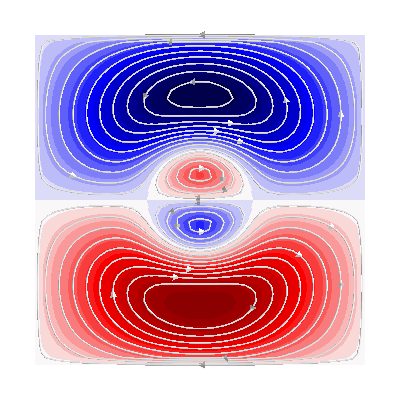
plotter = fig = pv.Plotter(window_size=(400, 400))
plotter = fig = plot_3d_current_loops(
    contours1, tube_radius=0.005, colors=(0.9, 0.9, 0.9), figure=fig
)
m = abs(s1).max()
mask = mesh1.triangles_center[:, 1] > 0
faces1 = mesh1.faces[mask]
surf = plotter.add_mesh(
    triangle_mesh(*mesh1.vertices.T, faces1),
    scalars=s1.vert,
    cmap="seismic",
    clim=[-m, m],
    show_scalar_bar=False,
)
setscene(fig, surf, 1)

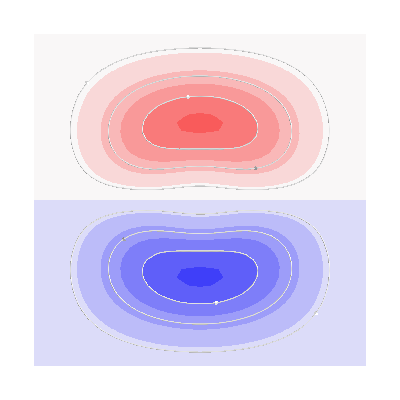
plotter = fig = pv.Plotter(window_size=(400, 400))
plotter = fig = plot_3d_current_loops(
    contours2, tube_radius=0.005, colors=(0.9, 0.9, 0.9), figure=fig
)
faces2 = mesh2.faces[mesh2.triangles_center[:, 1] > 0]
surf = plotter.add_mesh(
    triangle_mesh(*mesh2.vertices.T, faces2),
    scalars=s2.vert,
    cmap="seismic",
    clim=[-m, m],
    show_scalar_bar=False,
)
setscene(fig, surf, 2)
Processing contour, value: -0.6538558291730995
Processing contour, value: -0.5850288997864574
Processing contour, value: -0.5162019703998154
Processing contour, value: -0.4473750410131734
Processing contour, value: -0.37854811162653135
Processing contour, value: -0.3097211822398893
Processing contour, value: -0.24089425285324728
Processing contour, value: -0.17206732346660525
Processing contour, value: -0.10324039407996322
Processing contour, value: -0.03441346469332118
Processing contour, value: 0.03441346469332085
Processing contour, value: 0.10324039407996288
Processing contour, value: 0.17206732346660492
Processing contour, value: 0.24089425285324695
Processing contour, value: 0.309721182239889
Processing contour, value: 0.3785481116265311
Processing contour, value: 0.44737504101317305
Processing contour, value: 0.516201970399815
Processing contour, value: 0.5850288997864571
Processing contour, value: -0.17206732346660514
Processing contour, value: -0.10324039407996308
Processing contour, value: -0.034413464693321016
Processing contour, value: 0.034413464693321044
Processing contour, value: 0.1032403940799631
Processing contour, value: 0.17206732346660514
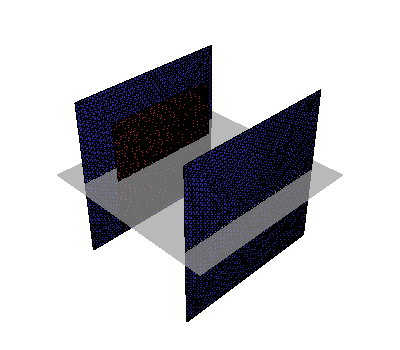
plotter = fig = pv.Plotter()
surf = plotter.add_mesh(
    triangle_mesh(*mesh1.vertices.T, mesh1.faces),
    color=(0.8, 0.2, 0.2),
    show_scalar_bar=False,
)
mesh_actor(surf).prop.edge_visibility = True
mesh_actor(surf).prop.render_lines_as_tubes = True
mesh_actor(surf).prop.line_width = 1.2


surf = plotter.add_mesh(
    triangle_mesh(*mesh2.vertices.T, mesh2.faces),
    color=(0.2, 0.2, 0.8),
    show_scalar_bar=False,
)
mesh_actor(surf).prop.edge_visibility = True
mesh_actor(surf).prop.render_lines_as_tubes = True
mesh_actor(surf).prop.line_width = 1.2
# Plot plane
plane = plotter.add_mesh(
    triangle_mesh(
        np.array([x[0], x[-1], x[-1], x[0]]),
        np.array([x[0], x[0], x[-1], x[-1]]),
        np.zeros(4),
        np.array([[0, 1, 2], [2, 3, 0]]),
    ),
    color=(0.7, 0.7, 0.7),
    opacity=0.7,
    show_scalar_bar=False,
)

# Display the assembled scene (Sphinx-Gallery captures it during docs builds).
if "plotter" in globals() and not plotter._closed:
    plotter.show()
Total running time of the script: (1 minutes 48.714 seconds)