Note
Go to the end to download the full example code.
Design a field enclosed in a volume
import pyvista as pv
from bfieldtools._example_plots import mesh_actor
from bfieldtools._example_plots import triangle_mesh

pv.set_plot_theme("document")


import numpy as np
import matplotlib.pyplot as plt

# import trimesh

from bfieldtools.mesh_conductor import MeshConductor, StreamFunction
from bfieldtools.mesh_magnetics import magnetic_field_coupling as compute_C
from bfieldtools.mesh_magnetics import (
    magnetic_field_coupling_analytic as compute_C_analytic,
)
from bfieldtools.mesh_magnetics import scalar_potential_coupling as compute_U
from bfieldtools.mesh_impedance import mutual_inductance_matrix
from bfieldtools.contour import scalar_contour
from bfieldtools import sphtools
from bfieldtools.utils import load_example_mesh
from bfieldtools.mesh_calculus import mass_matrix

# domain = 'sphere'
# domain = 'cube'
domain = "combined"

if domain == "sphere":
    from trimesh.creation import icosphere

    mesh1 = icosphere(3, 0.65)
    mesh2 = icosphere(3, 0.8)
elif domain == "cube":
    from trimesh.creation import box
    from trimesh.smoothing import filter_laplacian

    mesh1 = box((1.0, 1.0, 1.0))
    mesh2 = box((1.5, 1.5, 1.5))

    for i in range(4):
        mesh1 = mesh1.subdivide()
        mesh2 = mesh2.subdivide()

    mesh1 = filter_laplacian(mesh1)
    mesh2 = filter_laplacian(mesh2, 0.9)
elif domain == "combined":
    from trimesh.creation import icosphere

    mesh1 = icosphere(4, 0.65)
    mesh2 = load_example_mesh("cube_fillet")
    mesh2.vertices -= mesh2.vertices.mean(axis=0)
    mesh2.vertices *= 0.15
#    mesh2 = mesh2.subdivide()

coil1 = MeshConductor(
    mesh_obj=mesh1,
    N_sph=3,
    inductance_nchunks=100,
    fix_normals=False,
    inductance_quad_degree=2,
)
coil2 = MeshConductor(
    mesh_obj=mesh2,
    N_sph=3,
    inductance_nchunks=100,
    fix_normals=False,
    inductance_quad_degree=2,
)

M11 = coil1.inductance
M22 = coil2.inductance
# Add rank-one matrix, so that M22 can be inverted
M22 += np.ones_like(M22) / M22.shape[0] * np.mean(np.diag(M22))
M11 += np.ones_like(M11) / M11.shape[0] * np.mean(np.diag(M11))
M21 = mutual_inductance_matrix(mesh2, mesh1)

M = np.block([[M11, M21.T], [M21, M22]])


x = y = np.linspace(-0.85, 0.85, 100)
X, Y = np.meshgrid(x, y, indexing="ij")
points = np.zeros((X.flatten().shape[0], 3))
points[:, 0] = X.flatten()
points[:, 1] = Y.flatten()

CB1 = compute_C_analytic(mesh1, points)
CB2 = compute_C_analytic(mesh2, points)

CU1 = compute_U(mesh1, points)
CU2 = compute_U(mesh2, points)
Computing the inductance matrix...
Computing self-inductance matrix using rough quadrature (degree=2).              For higher accuracy, set quad_degree to 4 or more.
Computing triangle-coupling matrix
Inductance matrix computation took 15.28 seconds.
Computing the inductance matrix...
Computing self-inductance matrix using rough quadrature (degree=2).              For higher accuracy, set quad_degree to 4 or more.
Computing triangle-coupling matrix
Inductance matrix computation took 16.59 seconds.
Estimating 24888 MiB required for 2665 by 2562 vertices...
Computing inductance matrix in 40 chunks (13796 MiB memory free),              when approx_far=True using more chunks is faster...
Computing triangle-coupling matrix
Computing magnetic field coupling matrix analytically, 2562 vertices by 10000 target points... took 26.54 seconds.
Computing magnetic field coupling matrix analytically, 2665 vertices by 10000 target points... took 24.13 seconds.
Computing scalar potential coupling matrix, 2562 vertices by 10000 target points... took 24.79 seconds.
Computing scalar potential coupling matrix, 2665 vertices by 10000 target points... took 24.95 seconds.
suh = SuhBasis(mesh1, 100)
b10 = mesh1.vertex_normals[:, 0] b20 = (
mesh1.vertex_normals[:, 0] * mesh1.vertices[:, 0] - mesh1.vertex_normals[:, 1] * mesh1.vertices[:, 1]
)
N = mass_matrix(mesh1, lumped=True)
af, bf = sphtools.basis_fields(mesh1.vertices, 2)
b1 = N @ np.sum(bf[:, :, 2] * mesh1.vertex_normals, axis=1)
b2 = N @ np.sum(bf[:, :, 3] * mesh1.vertex_normals, axis=1)


def plot_plane(opacity=0.8):
    plotter.add_mesh(
        triangle_mesh(
            np.array([x[0], x[-1], x[-1], x[0]]),
            np.array([x[0], x[0], x[-1], x[-1]]),
            np.zeros(4),
            np.array([[0, 1, 2], [2, 3, 0]]),
        ),
        color=(0.7, 0.7, 0.7),
        opacity=opacity,
        show_scalar_bar=False,
    )


for bi in (b1, b2):
    bb = np.zeros(M.shape[1])
    bb[: M11.shape[1]] = bi
    I = np.linalg.solve(M, bb)
    I1 = I[: M11.shape[1]]
    I2 = I[M11.shape[1] :]
    B1 = CB1 @ I1
    B2 = CB2 @ I2
    U1 = CU1 @ I1
    U2 = CU2 @ I2
    cc1 = scalar_contour(mesh1, mesh1.vertices[:, 2], contours=[-0.001])[0]
    cc2 = scalar_contour(mesh2, mesh2.vertices[:, 2], contours=[-0.001])[0]
    B = (B1.T + B2.T)[:2].reshape(2, x.shape[0], y.shape[0])
    lw = np.sqrt(B[0] ** 2 + B[1] ** 2)
    lw = 2 * lw / np.max(lw)
    xx = np.linspace(-1, 1, 16)
    seed_points = np.array([cc1[:, 0], cc1[:, 1]]) * 1.01
    U = (U1 + U2).reshape(x.shape[0], y.shape[0])
    U /= np.max(U)
    plt.figure()
    plt.contourf(X, Y, U.T, cmap="seismic", levels=40)
    plt.streamplot(
        x,
        y,
        B[1],
        B[0],
        density=2,
        linewidth=lw,
        color="k",
        start_points=seed_points.T,
        integration_direction="both",
    )
    plt.plot(cc1[:, 1], cc1[:, 0], linewidth=3.0, color="gray")
    plt.plot(cc2[:, 1], cc2[:, 0], linewidth=3.0, color="gray")
    plt.xticks([])
    plt.yticks([])
    plt.axis("image")
    plotter = pv.Plotter()
    contours1 = scalar_contour(mesh1, I1, 12)
    contours2 = scalar_contour(mesh2, I2, 12)
    surf = plotter.add_mesh(
        triangle_mesh(*mesh1.vertices.T, mesh1.faces),
        scalars=I1,
        cmap="BrBG",
        show_scalar_bar=False,
    )
    mesh_actor(surf).mapper.interpolate_before_map = True
    mesh_actor(surf).mapper.lookup_table.n_values = 16
    faces2_masked = mesh2.faces[
        np.linalg.norm(mesh2.triangles_center - np.array([0.75, 0.75, 0.75]), axis=1)
        > 1.2
    ]
    surf = plotter.add_mesh(
        triangle_mesh(*(mesh2.vertices * 0.99).T, faces2_masked),
        scalars=I2,
        opacity=1.0,
        cmap="BrBG",
        show_scalar_bar=False,
    )
    mesh_actor(surf).mapper.interpolate_before_map = True
    mesh_actor(surf).mapper.lookup_table.n_values = 16
    plot_plane(0.5)
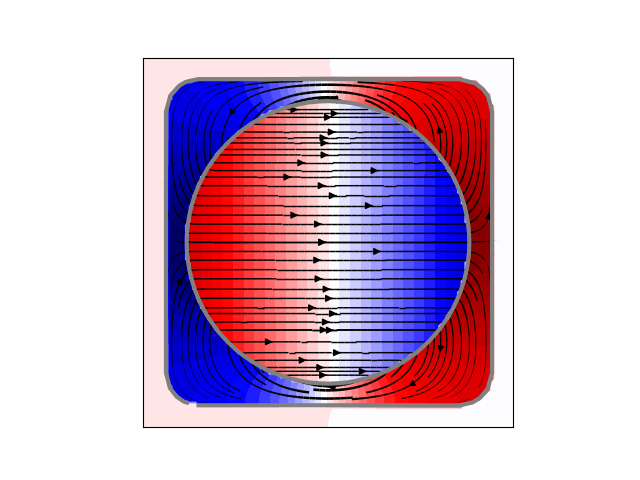
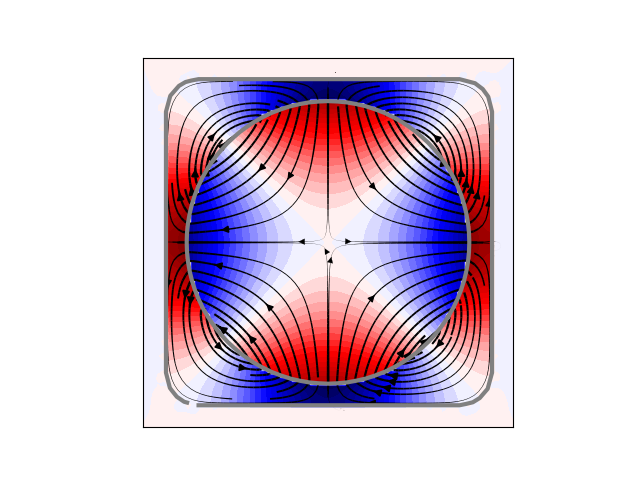
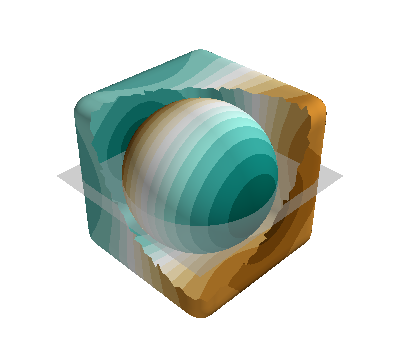
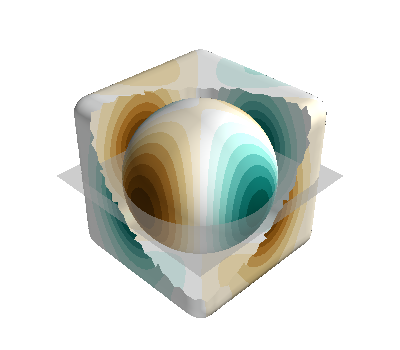
Processing contour, value: -0.001
Processing contour, value: -0.001
Processing contour, value: -0.7447841544776702
Processing contour, value: -0.610110452836707
Processing contour, value: -0.4754367511957435
Processing contour, value: -0.3407630495547802
Processing contour, value: -0.20608934791381683
Processing contour, value: -0.07141564627285346
Processing contour, value: 0.0632580553681098
Processing contour, value: 0.19793175700907317
Processing contour, value: 0.33260545865003655
Processing contour, value: 0.4672791602909999
Processing contour, value: 0.6019528619319633
Processing contour, value: 0.7366265635729267
Processing contour, value: -0.4230645311359734
Processing contour, value: -0.34531143842526996
Processing contour, value: -0.2675583457145665
Processing contour, value: -0.18980525300386303
Processing contour, value: -0.11205216029315962
Processing contour, value: -0.034299067582456155
Processing contour, value: 0.04345402512824731
Processing contour, value: 0.12120711783895072
Processing contour, value: 0.19896021054965424
Processing contour, value: 0.27671330326035765
Processing contour, value: 0.35446639597106105
Processing contour, value: 0.4322194886817646
Processing contour, value: -0.001
Processing contour, value: -0.001
Processing contour, value: -0.47105258877829687
Processing contour, value: -0.3849785143102554
Processing contour, value: -0.298904439842214
Processing contour, value: -0.21283036537417255
Processing contour, value: -0.12675629090613116
Processing contour, value: -0.040682216438089724
Processing contour, value: 0.045391858029951715
Processing contour, value: 0.1314659324979931
Processing contour, value: 0.2175400069660346
Processing contour, value: 0.303614081434076
Processing contour, value: 0.38968815590211736
Processing contour, value: 0.47576223037015886
Processing contour, value: -0.23377253062982642
Processing contour, value: -0.1918373796270792
Processing contour, value: -0.14990222862433197
Processing contour, value: -0.10796707762158475
Processing contour, value: -0.06603192661883756
Processing contour, value: -0.024096775616090332
Processing contour, value: 0.01783837538665689
Processing contour, value: 0.059773526389404086
Processing contour, value: 0.10170867739215134
Processing contour, value: 0.14364382839489853
Processing contour, value: 0.18557897939764573
Processing contour, value: 0.22751413040039298
plotter = pv.Plotter()
s1 = plotter.add_mesh(
    triangle_mesh(*mesh1.vertices.T, mesh1.faces[:, ::-1]),
    color=(0.5, 0.5, 0.5),
    opacity=1.0,
    show_scalar_bar=False,
)
mesh_actor(s1).prop.backface_culling = True
w1 = plotter.add_mesh(
    triangle_mesh(*mesh1.vertices.T + 0.009 * mesh1.vertex_normals.T, mesh1.faces),
    color=(1, 0, 0),
    style="wireframe",
    show_scalar_bar=False,
)
mesh_actor(w1).prop.render_lines_as_tubes = True

s2 = plotter.add_mesh(
    triangle_mesh(*mesh2.vertices.T, mesh2.faces[:, ::-1]),
    color=(0.5, 0.5, 0.5),
    opacity=1.0,
    show_scalar_bar=False,
)
mesh_actor(s2).prop.backface_culling = True
faces2_masked = mesh2.faces[(mesh2.triangles_center @ np.array([1, 1, 1])) < 1]
w2 = plotter.add_mesh(
    triangle_mesh(*mesh2.vertices.T + +0.009 * mesh2.vertex_normals.T, faces2_masked),
    color=(0, 0, 1),
    style="wireframe",
    show_scalar_bar=False,
)
mesh_actor(w2).prop.render_lines_as_tubes = True
plot_plane()

# Display the assembled scene (Sphinx-Gallery captures it during docs builds).
if "plotter" in globals() and not plotter._closed:
    plotter.show()
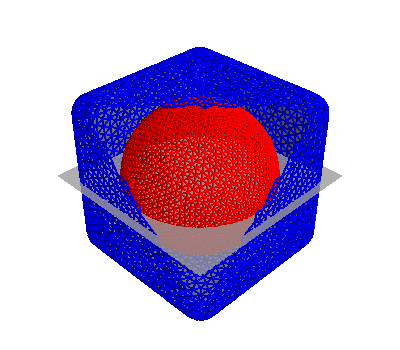
Total running time of the script: (2 minutes 33.776 seconds)